01 · Library
Choose your folder and HyperSFX analyzes the duration and attack of each sound in the background. Search by name, filter by category, listen and mark favorites with a star.
The hit of every effect, nailed to the cut. HyperPowers brings no sounds: the library is yours.
Illustrative animation. Pause it with the button at the bottom right.
Sound familiar?Thousands of whooshes in folders.
Thousands of whooshes, pops and risers spread across folders. Finding the right one and lining its hit up with the cut, one by one, eats your afternoon. And when the client asks for “more sound”, you start over.
HyperSFX manages your library and places the sounds for you. The library is yours: HyperPowers ships no sounds, points to your folder and changes nothing in it.
Library, placing, and an experimental AI pass.
Choose your folder and HyperSFX analyzes the duration and attack of each sound in the background. Search by name, filter by category, listen and mark favorites with a star.
Pick a sound and where it goes. On the selection: at the start of each selected clip (video, text or audio). At the cursor: at the playhead, with nothing selected. Always on the lowest free audio track, with the attack on the cut.
Sync attack moves the sound earlier by how long it takes to start. No tail trims the silence at the end. Rotate favorites alternates your stars clip by clip. Level in dB. Reset removes what you placed this session.
Super beta. It looks at cuts, texts coming in, zooms, transitions and, if you want, the motion inside the image, then proposes a sound from your library for each moment. It works best with your favorites. You review the plan before applying.
BetaIn HyperChat: “put a whoosh at the cursor”, or “place the chosen sound at the start of the selected clips at -10 dB”.
Two jobs, with the buttons named as in the panel.
Four texts, one whoosh each, with the hit on the cut.
Press Folder… and wait for the analysis.
Search “whoosh”, listen, and star the ones you like.
Select the texts and press Place on the selection, with Sync attack on.
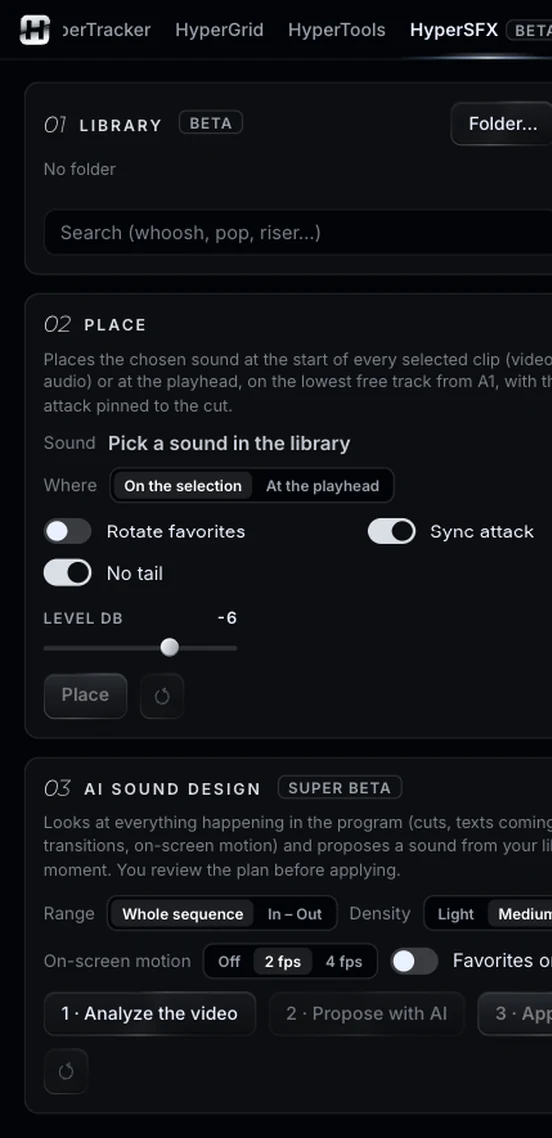
Super beta: a proposal you review, never an automatic edit.
Turn on Only favorites. Choose the range (whole sequence or In to Out) and the density.
1 · Analyze the video, with or without image motion.
2 · Propose with AI, review the plan and press 3 · Apply plan.
HyperSFX works best when something else makes the cuts.
Same panel, same license. Every tool works on its own and hands off to the next.
Edit by typing: one-cut summaries, topic clips, multicam podcasts.
02Captions you don’t have to redo, and text you can animate by hand.
03Animated captions inside Premiere, line by line and editable.
04Clean the voice, split the music, cut silences on the waveform.
05Make text follow whatever moves, or stabilize a shot.
06Split screens from your clips, without doing the math.
07The one-click buttons Premiere is missing.
09Cinematic color, guided, loaded into Lumetri.
Nine tools.
One license.